Home - under $200
Best Smart Lock Under $200
You no longer have to spend $300 for a fingerprint deadbolt. You do still have to check that your door will take one.
By Brijon M. - Published October 17, 2026
The short answer
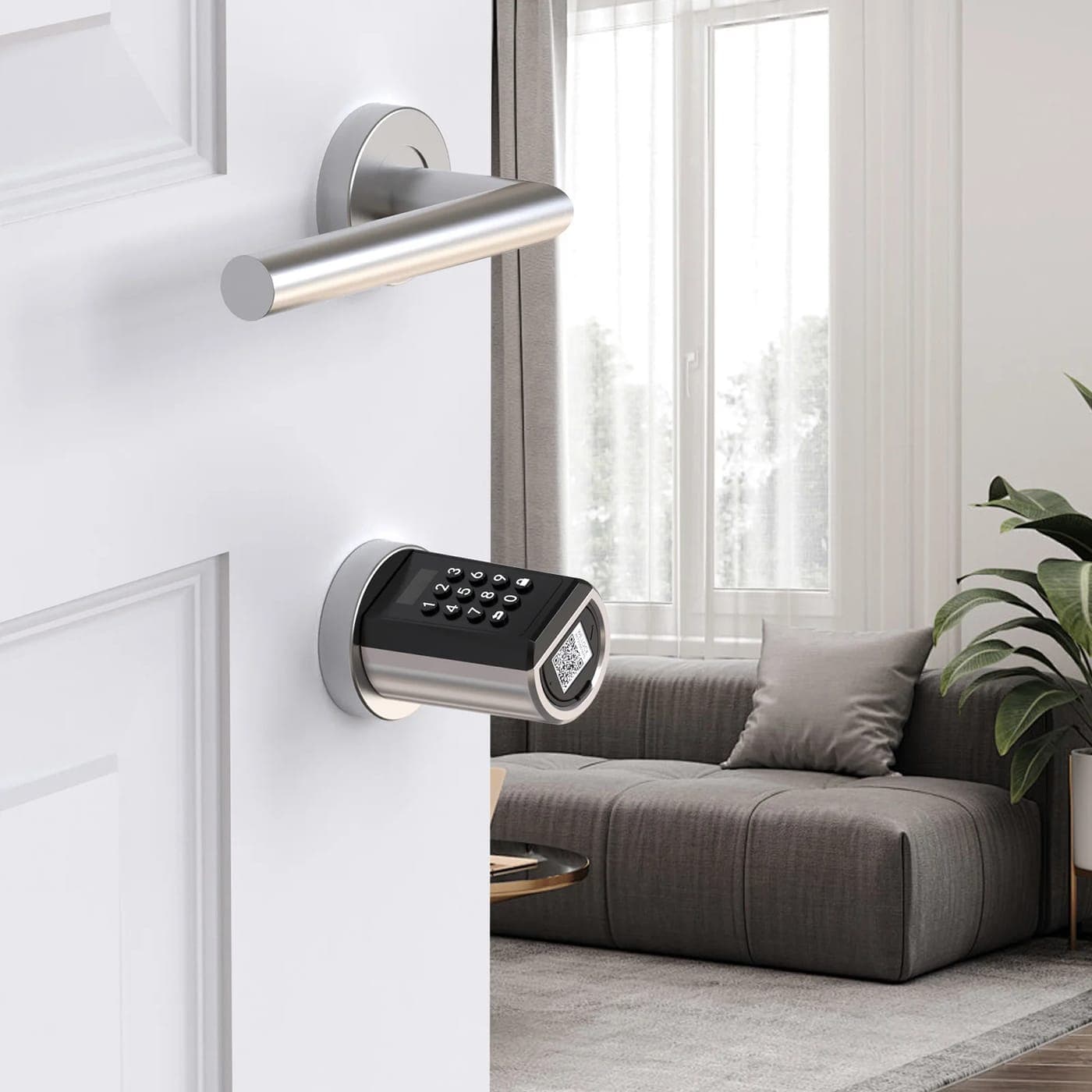
The eufy Security Smart Lock C220 is the best smart lock under $200 for most homes: fingerprint, keypad, app and physical key entry, built-in Wi-Fi with no separate bridge, and a BHMA Grade 3 rating. If you rent, buy a keypad lever or a retrofit that keeps your existing deadbolt and key instead.
Disclosure: we earn commission on qualifying purchases made through the links below, at no extra cost to you. It never changes the order of our picks - here is how that works.
Measure your door before you shop
More smart locks get returned over fit than over features. Ten minutes with a tape measure saves the whole exercise, and these are the four numbers.
Door thickness. Standard US exterior doors are 1 3/8" to 1 3/4". Most locks cover that range as standard; anything thicker needs an extension kit that may or may not exist for the model.
Backset. The distance from the edge of the door to the centre of the bore hole - almost always 2 3/8" or 2 3/4". Nearly all deadbolts ship with an adjustable latch covering both, but confirm it.
Bore hole diameter. Usually 2 1/8". A smaller bore means drilling, which is a different job.
Which way the door opens, and what is behind it. Smart deadbolts have a fat interior escutcheon housing the batteries and motor. If a storm door, a deep trim moulding or a door chain sits where that body needs to go, the lock will not sit flush.
If any of that comes back non-standard, stop and look at retrofit locks, which keep your existing deadbolt and just motorize the thumb turn on the inside.
- Thickness 1 3/8"-1 3/4", backset 2 3/8" or 2 3/4", bore 2 1/8" - the standard set.
- Renting? Retrofit or keypad lever only. Do not change a deadbolt you do not own.
- Built-in Wi-Fi beats a bridge, but costs battery life.
- BHMA Grade 1 is best, Grade 3 is the residential baseline. No grade at all is a flag.
What the specs actually mean
BHMA grade. The Builders Hardware Manufacturers Association grades locks 1 to 3 on durability, strength and finish, with Grade 1 the highest. Grade 3 is the standard residential baseline and is what most locks in this price band carry. A lock with no stated grade at all has not been through the testing, which is worth knowing.
Built-in Wi-Fi vs a bridge. Wi-Fi in the lock means you can unlock it from anywhere with no extra hardware - and it costs battery life, because a Wi-Fi radio is power-hungry. A Bluetooth lock with a separate plug-in bridge gets much longer battery life and adds a box to buy and a thing to fail. Both approaches are represented below.
Auto-lock. The feature people actually use daily. The door locks itself a set number of seconds after closing, which solves the real-world failure mode of simply forgetting.
Fingerprint. Now routine under $200 and genuinely the fastest way in with full hands. The thing to check is how many prints it stores and whether it can be re-enrolled without a factory reset.
Physical key override. Some models drop it for a cleaner look. We would not: a key cylinder is the backup for a dead battery, and the alternative backup - jumping 9V across contacts on the outside of the lock - is a worse experience in the rain.
Quick picks
The short version. Tap any row to jump to the full write-up, or go straight to Amazon to check the current price.
| # | Product | Best for | Price |
|---|---|---|---|
| 1 | eufy Security Smart Lock C220 Fingerprint, keypad, app, key - built-in Wi-Fi, BHMA Grade 3, no bridge. | Best overall | |
| 2 | Schlage Encode Smart Wi-Fi Deadbolt The strongest lock here as a lock, from a company that made locks first. | Best built | |
| 3 | TP-Link Tapo DL100 smart Wi-Fi deadbolt Built-in Wi-Fi, 200 codes and an IP54 rating well under the ceiling. | Best value Wi-Fi lock | |
| 4 | TEEHO TE001 keyless entry deadbolt A keypad deadbolt with auto-lock for about the price of a decent dumb one. | Cheapest that is worth buying | |
| 5 | A retrofit smart lock (interior-side only) Motorizes the thumb turn you already have - no drilling, no key change. | Best for renters |
We do not print prices on this site. Every button opens the live Amazon listing so you see the real price at the moment you click. See our affiliate disclosure.
1. Best overall
eufy Security Smart Lock C220
Fingerprint, keypad, app, key - built-in Wi-Fi, BHMA Grade 3, no bridge.
- Fingerprint, keypad, app, key and voice entry
- Built-in Wi-Fi - no bridge required
- BHMA Grade 3
- Roughly 8 months of battery life claimed
This is the pick that covers the most households. Everything you would want from a smart lock is here, and nothing in it depends on buying a second box.
Six ways in matters more than it sounds. A fingerprint for you, a code for the dog walker, the app when you are away, and a physical key in your wallet for the day the batteries die - that combination is the whole point of a smart lock and it is rare to get all of it under $200.
No bridge is the quiet value argument. Bluetooth-only locks that need a $40-$60 Wi-Fi bridge to do anything remote are often the dearer purchase once the bridge is counted.
What you give up
BHMA Grade 3 is the residential baseline rather than a high bar, and the exterior housing is chunkier than a plain deadbolt. Built-in Wi-Fi drinks batteries faster than a Bluetooth-plus-bridge design.
2. Best built
Schlage Encode Smart Wi-Fi Deadbolt
The strongest lock here as a lock, from a company that made locks first.
- Built-in Wi-Fi - no bridge required
- BHMA Grade 1 on the standard Encode deadbolt
- Up to 100 access codes
- Keypad with physical key override
Most smart locks are electronics companies' attempts at a lock. Schlage is a lock company's attempt at electronics, and in a category where the product's job is to resist someone kicking a door, that ordering is worth something.
The standard Encode deadbolt carries BHMA Grade 1 - the highest residential rating, and a genuine step above the Grade 3 that most of this price band settles for.
Wi-Fi is built in, so there is no bridge, and 100 codes is plenty for a household plus trades plus a holiday let.
If what you want is a secure deadbolt that also happens to be smart - rather than a smart device that also happens to lock - this is the one.
What you give up
No fingerprint reader on the standard Encode, it usually sits at the top of this budget, and the Wi-Fi radio means battery changes two or three times a year rather than once.
3. Best value Wi-Fi lock
TP-Link Tapo DL100 smart Wi-Fi deadbolt
Built-in Wi-Fi, 200 codes and an IP54 rating well under the ceiling.
- Built-in Wi-Fi
- Up to 200 access codes
- BHMA Grade 3
- IP54 weather rating, USB-C emergency power
TP-Link has done to locks what it did to smart plugs: taken the feature list of a more expensive product and sold it for less.
The two details worth calling out are the IP54 weather rating - relevant on an exposed front door with no porch - and the USB-C emergency power port, which means a dead battery is solved with the power bank in your bag rather than a locksmith.
Two hundred access codes is far more than a house needs and exactly right for a short-term rental.
What you give up
No fingerprint at this level, and TP-Link's smart-home app sprawl means another account in another app. Grade 3 rather than Grade 1.
4. Cheapest that is worth buying
TEEHO TE001 keyless entry deadbolt
A keypad deadbolt with auto-lock for about the price of a decent dumb one.
- Keypad entry with 20 user codes
- Auto-lock
- Physical key override included
- Long battery life - no Wi-Fi radio
No Wi-Fi, no app, no account - just a keypad, auto-lock and a key. For a large number of households that is the entire feature set they will ever use.
Dropping the radio is why the batteries last so long. A keypad-only lock measures its battery life in a year or more rather than months, because nothing is listening for a network.
It is also the honest answer for a garage side door, a back door or a rental you are furnishing, where paying for remote access you will never open an app for makes no sense.
What you give up
No remote anything. You cannot let someone in from work, you cannot check whether you locked it, and you cannot issue a temporary code from the sofa. If those matter, buy one of the Wi-Fi locks above.
5. Best for renters
A retrofit smart lock (interior-side only)
Motorizes the thumb turn you already have - no drilling, no key change.
- Fits over the existing interior thumb turn
- Exterior hardware and keys unchanged
- Usually adhesive or set-screw mounted
- Bluetooth, with an optional Wi-Fi bridge
If you rent, this is the category you should be shopping in. Nothing is drilled, the exterior of the door is untouched, your landlord's key still works, and the whole thing comes off in two minutes when you move.
It also solves the fit problem. A retrofit does not care about backset or bore, because it is not replacing the lock - it is turning the thumb turn for you.
Auto-lock and app unlocking both work exactly as they would on a full deadbolt, because the mechanism being driven is the same one.
What you give up
No keypad on the outside unless you add one, so entry is by phone - which is a problem when the phone is dead. Adhesive mounts can creep on a stiff deadbolt, and a stiff deadbolt should be lubricated before you fit one rather than after it fails.
Renting? Read this before anything else
Changing an exterior deadbolt on a property you do not own is, in most leases, a modification requiring permission - and it also breaks the landlord's key, which is both a practical and a legal problem in an emergency.
The two safe routes are a retrofit that motorizes the interior thumb turn and leaves the cylinder and keys alone, or a keypad lever on an interior door such as a home office. Both come off cleanly at the end of the tenancy.
Keep the original hardware. Every screw, the strike plate, the old thumb turn - in a labelled bag, in a drawer. Losing the original deadbolt is how a $60 upgrade becomes a deposit deduction.
Batteries, and what happens when they die
Every smart lock runs on batteries, and every smart lock will at some point be flat. The design question is what happens next.
A physical key cylinder is the best answer, and it is the reason we would not buy a keyless-only lock for a front door. A key in a wallet costs nothing and works in the rain.
A USB-C or terminal jump is the second-best answer. The Tapo DL100 takes USB-C from a power bank, which turns a dead lock into a thirty-second problem - provided you carry a power bank or can borrow one.
Neither means a locksmith, a drill and a new lock. Check before you buy, not from the doorstep.
Practical habits that help: change the batteries on a date rather than on a warning, use good alkalines rather than the ones in the box, and note that built-in Wi-Fi roughly halves battery life compared with a Bluetooth-plus-bridge lock. Our best power bank under $50 roundup covers the backup that makes a USB-C lock trivial to rescue.
Security, realistically
A smart lock changes your convenience far more than it changes your security, and it is worth being clear about why.
Most residential break-ins are not lock-picking. They are a kicked door, a smashed window or an unlocked back door. The strongest lock in this roundup is attached to a door frame and a strike plate, and a Grade 1 deadbolt in a frame with 1-inch screws into soft trim is still a weak door. Fitting 3-inch screws that reach the stud behind the frame costs a few dollars and does more for your security than the difference between any two locks on this page.
Where a smart lock genuinely helps is behavior. Auto-lock removes the single most common real-world failure - a door that was never locked at all - and temporary codes mean a key is not floating around with a contractor six months after the job.
Where it adds risk: codes get shoulder-surfed, and a worn keypad shows which four digits are in the code. Use a code length longer than four digits where the lock allows it, change codes when a trade finishes, and clean the keypad.
If you are hardening the front of the house more broadly, best doorbell camera under $100 is the other change that actually alters behavior, and best security camera under $100 covers the rest.
How we picked
Every pick on this page is a real, currently-sold product that we could find at or under $200 at the time of the last update. Rank order is set before any link is attached.
We are research-led, not lab-led. We do not run a test lab and we do not claim to have personally used every product on this site. Picks come from manufacturer specifications, owner-reported reliability and failure patterns, expert-publication consensus, and real availability at the stated price ceiling. Read the full method.
Common questions
+What is the best smart lock under $200?
The eufy Security Smart Lock C220 for most homes - fingerprint, keypad, app, voice and physical key entry, built-in Wi-Fi with no bridge to buy, and a BHMA Grade 3 rating. If build quality matters more than fingerprint entry, the Schlage Encode is BHMA Grade 1 and the stronger lock.
+Will a smart lock fit my door?
Check four things: door thickness (1 3/8" to 1 3/4" is standard), backset (2 3/8" or 2 3/4"), bore hole (usually 2 1/8"), and whether anything - a storm door, deep trim, a door chain - sits where the interior body needs to go. If any of those are non-standard, buy a retrofit lock that keeps your existing deadbolt instead.
+Can renters install a smart lock?
Not a replacement deadbolt, in most leases - that is a modification and it breaks the landlord's key. Use a retrofit lock that fits over the existing interior thumb turn and leaves the exterior cylinder and keys untouched, and keep every piece of original hardware for the end of the tenancy.
+What happens if the batteries die in a smart lock?
It depends on the model. A lock with a physical key cylinder is opened with the key. The Tapo DL100 takes emergency power over USB-C from a power bank. A keyless lock with neither leaves you calling a locksmith, which is why we would not fit one on a front door.
+Do smart locks need Wi-Fi?
Only for remote features. Keypad locks like the TEEHO TE001 work entirely offline and have far longer battery life as a result. Built-in Wi-Fi lets you unlock from anywhere with no extra hardware; a Bluetooth lock plus a plug-in bridge does the same thing with better battery life and one more box.
+Are smart locks less secure than normal deadbolts?
Not meaningfully, and the lock is rarely the weak point. A kicked door beats any deadbolt attached to a frame with short screws, so fitting 3-inch screws that reach the stud does more for your security than any lock upgrade. The real smart-lock risks are shoulder-surfed codes and worn keypads showing which digits you press.
Sources
Read next
Best doorbell camera under $100
Best Doorbell Camera Under $100 (October 2026)
Four video doorbells under $100, sorted by the thing that actually costs money: whether you need a cloud subscription.
Best security camera under $100
Best Security Camera Under $100 (October 2026)
The subscription costs more than the camera. Five picks that record locally and cost nothing to run.
Best LED strip lights under $50
Best LED Strip Lights Under $50
RGB, RGBIC or plain white - five strips under $50, what the brightness numbers mean, and the adhesive problem nobody warns you about.
Smart plug pick
Best Smart Plug Under $50
Four-packs beat single plugs, slim bodies beat fat ones, and energy monitoring is nearly free. The five worth buying under $50.
Category
Home
Vacuums, air purifiers, chairs and mattresses, judged on the two or three specs that actually matter.
Shop by price
Under $200
Where the compromises start disappearing. Mostly appliances, furniture and bigger tech.
Think we got a pick wrong, or spotted one that is out of stock or over its ceiling? Tell us - corrections go to the front of the queue.